Two carriers
A UDP stream from a sender node to a receiver node, bonded by Raft over two connections, such as two Ethernet cables or LTE and 5G. If one connection drops or degrades, the stream continues over the other.
This is the setup the Getting Started guide walks you through step by step, from connecting the machines to streaming a webcam. Start there if this is your first setup; this page is the short version with ready-made files.
Requirements
- Two nodes that can reach each other, ideally over two network interfaces each.
- GStreamer on both, to produce and show the stream.
Steps
- Import the sender pipeline on the sender node and the receiver pipeline on the receiver node, with Pipelines → Add → From File.
- On the receiver, set the Address of the two UDP Local components to the receiver's address on each connection, for example
10.10.1.2:3301and10.10.2.2:3302. - On the sender, set the Remote Address of the two Peer Writer components to those same addresses, and the Interface of the two UDP Remote components to the interface each connection uses, for example
eth0andeth1. - Start the receiver pipeline, then the sender pipeline. The link is up when both Log tabs show New Session Bound, once per carrier.
- Start the GStreamer receiver and sender commands from the GStreamer guide.
When the carriers are up, the diagram shows packets moving over both of them:
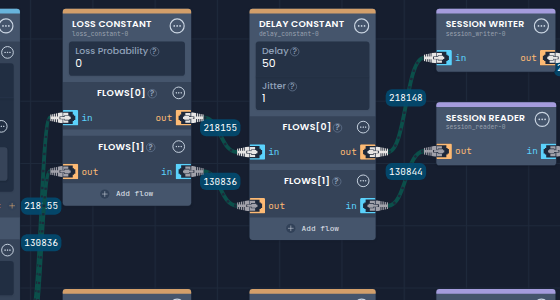
The sender has a Loss Constant and a Delay Constant on each carrier for simulating a worse link. They add 50 ms of delay and 1 ms of jitter by default, with no loss; set them to 0 to test the real connections.
To use more connections, create the pipelines with the UDP Video Streaming template instead. It builds all the components each carrier needs, for any number of connections.